My friend Kate has been a very positive influence on my life and helped me shape my thinking. She is always interested in improving herself, and helping others improve. Based on her suggestions, I came up with a list of goals I would like to achieve and set my mind to them. I have been in the process of coming up with new goals, and I wanted to analyze my older goals. I thought I would post the analysis on my blog for my friends and family to read and comment on.
1.) Pay off car in 8 months (in account or paid)
* My cousin and I were involved in a car wreck and we owed the rental car company most of the money for the car. I was able to talk them out of about 25% of what they wanted us to pay. My cousin was an unauthorized driver, and I made a mistake authorizing him to drive. We went half on the expenses, even though I was 100% financially liable. The situation was pretty bad, but I am grateful that my cousin and I were able to talk and be involved in each other's life during this period. I was able to accomplish this within a month of setting my mind to it, mostly because of my cousin’s agreeability, good fortune and hard work.
2.) Finish Computer Science Masters Degree
This goal took a little bit longer than I was planning on, but thinking clearly about this definitely helped me choose which path to take. I was able to get my masters degree in May, 2009. Based on this goal, I choose to present my research to a board of professors instead of writing a thesis. I believe a thesis would have taken an additional 6-12 months to complete, and my goal was to get a masters degree, not necessarily a masters with a thesis. If I had cemented this goal into place earlier, and taken action based on that realization, I would have been done even earlier. Without it, I would have finished much later.
3.) Have Kate Johnson as a Girlfriend
This is the only goal I feel like I completely failed at. I focused too much on a lot of the negative aspects of our relationship, and failed to focus on the larger commonalities we share. Sometimes with concrete goals they are not achieved and this is one of those instances. I know I made a lot of serious mistakes with Kate and I can learn from those mistakes. I feel lucky that we are still friends. This is a goal where breaking it down into manageable chunks would have been good.
4.) Make Progress Towards Starting a Business
* MBA?
* Capital?
* Rental Property
Develop more specific goals towards this.
I was able to purchase some rental property and develop myself in that way. Without the support of my family, my old land lord Bob, my friend Oleg, and Kate pushing me to develop specific goals, this would have never happened.
5.) Write one letter or card per week to someone I care about
For this one, I started off really strong. However, things slowed down towards the end and eventually I forgot about it. I think I made a mistake by not keeping up with any kind of milestones, reminders or quantitative analysis of this. When I make a goal like this in the future, I plan on including a very detailed break down of it.
6.) Develop writing + web authoring skills further
My blog is a testimony to my web authoring skills, as is my learning of ActionScript. I finished a SANDReport for Sandia that will someday make it through review and approval, and I have another SAND report in the works. I feel pretty positive about this one.
7.) Learn how to make ceramic tile
If Kate didn't push me towards concretely writing down my goals, I never would have stepping into the UNM craft studio and learned how to do this. I feel like I accomplished this one. However, I still need to complete my table!
8.) Show more compassion
- listen more
- no interrupting people's sentences
For this one, I think I did better in general, but I still need to work on this. If I had done really well, I don’t think #3 would be a failure. Again, I feel like for these non-specific goals I need some sort of way to quantize them to make them more approachable on a day-to-day level.
9.) Stay Positive
This one has gone well. I find that if I stay very active, the positive outlook comes along.
10.) Practice Handball More
I think this one also went well. I went from a low B / high C player to a very solid B player. This one could have used more specifics and quantization, but still I feel good about it.
Thursday, July 23, 2009

Wednesday, July 8, 2009
Google Voice = Awesome
I was selected to participate in the new "Google Voice" closed beta test. So far, I love it! It's really cool being able to route calls to whatever phone you are currently at. Since I work inside a secured area, and cannot bring any personally owed electronics in (no cell phones) it makes giving people my work number a pain. However, Google Voice changes all that. Try clicking on the below link to give me a call using it!
In order to change the phones Google Voice will ring to, you need to authenticate that phone with the system (entering in a 2-digit code.) I think this is to make the service useful, as opposed to annoying by allowing arbitrary dialing and receiving of telephone calls (phone phreaking).
Here is a screen shot of how I can change the phones Google voice will ring on:
 When I am at work, I just forward all my calls to my work number. Once I get off work, I have them forwarded to my cell phone. It's really easy and convenient.
I hope to post some additional screen shots to my blog showing how cool this service is. If anyone has any specifics they want to know, just send me a comment. Hopefully this isn't violating the terms of the beta, but if it is, google should "do no evil" by gently reminding me before pulling the plug!
I just wanted to throw this post up really fast so people could try calling me with the embedded button.
In order to change the phones Google Voice will ring to, you need to authenticate that phone with the system (entering in a 2-digit code.) I think this is to make the service useful, as opposed to annoying by allowing arbitrary dialing and receiving of telephone calls (phone phreaking).
Here is a screen shot of how I can change the phones Google voice will ring on:
 When I am at work, I just forward all my calls to my work number. Once I get off work, I have them forwarded to my cell phone. It's really easy and convenient.
I hope to post some additional screen shots to my blog showing how cool this service is. If anyone has any specifics they want to know, just send me a comment. Hopefully this isn't violating the terms of the beta, but if it is, google should "do no evil" by gently reminding me before pulling the plug!
I just wanted to throw this post up really fast so people could try calling me with the embedded button.
Monday, June 22, 2009
Email Scraper - In Python with urllib and regular expressions


The past few weeks I have been messing around on the site rentacoder.com. Most of my work at Sandia lately has been writing (documents in English), with some IT work / configuration thrown in. This site seems to be a cool way to make some extra cash ($20 so far, only one success) and have fun writing programs.
One potential customer wanted someone to manually go to a bunch of web pages and harvest contact information. I started an email conversation with the guy, mentioning that I think there was a better way to automate this. Currently, I have a quick prototype I put together using urllib and regular expressions in python. If he picks up the project, I think I can find/create a better regular expression for email and clean up the data. Right now, I wanted to mess with writing some sort of email harvester; I just thought it would be fun (I have no aspirations towards becoming a spammer).
The code takes a list of fully qualified URLS, one per line. Here is the list the potential customer gave me.
http://weprintbarcodes.com
http://accstation.com
http://escan3d.com
http://edealsdepot.com
http://sandboxthreads.com
http://wildlifewonders.com
http://foreverbamboo.com
http://topsecretautomaticmoney.com
http://armormount.com
http://myjones.com
Here are the results after running my program:
brian@ubuntu-bind:~/tmp/other_programs/rent_a_coder/web_grabber$ time ./grabber.py
customerservice@weprintbarcodes.com
href="mailto:feedback@edealsdepot.com">Contact
freebies@sandboxthreads.com
src="https://p10.secure.hostingprod.com/@sandboxthreads.com/ssl/ecomby_128bit2.gif"
src="https://p10.secure.hostingprod.com/@sandboxthreads.com/ssl/paypal.gif"
Sculpture","http://ep.yimg.com/ip/I/wildlifegifts_2055_31879747","795","-@NULL@-");var
href="mailto:info@wildlifewonders.com">info@wildlifewonders.com
real 0m9.527s
user 0m0.312s
sys 0m0.208s
brian@ubuntu-bind:~/tmp/other_programs/rent_a_coder/web_grabber$
Not too great, but pretty good for about an hour and a couple of questions to my friend Aaron, who is awesome at Python. If I ever seriously want to write an email scraper (either for myself or a customer), I'll get a better regular expression, clean the output up, make it multithreaded and dump the email addresses to a database.
I may or may not ever actually post the code to this one, depending on how the rentacoder.com sales go. If you would like to see the code, leave me a comment with how to get in touch with you.
Saturday, June 13, 2009
417A Princeton - One of My Rental Units
Last November, I purchased a piece of property at 417 Princeton in Albuquerque, New Mexico. Fixing the place up, keeping tenants happy and growing a garden have been a lot of fun. I currently have 417A rented out until just before classes start at UNM, but I want to get things lined up after that. In order to get the place rented out for the summer, I prepared a lot of multimedia to send to two students that live in New York. Luckily, they decided to rent it for the summer! Hopefully these pictures and movies will help me keep the place rented out, as paying the entire mortgage without tenants is not something I want to do.
 417 Princeton - Front View
The above picture is an image of my house from the road. My parents and my friends helped me paint the place white and do all the trim work. It was a huge project, but the place looks a lot better now!
 Small Lantern

417A Princeton - Front Door

417A Princeton - Side Door
The below pictures were taken before my garden was going strong. My friend Efrain helped out a ton by arranging all the logistics of picking up rail road ties in Socorro for REALLY cheap ($5 per tie, instead of the $16 at Home Depot or Lowes). Efrain also loaned me his saw to cut them. My buddy Kevin did a lot of the heavy work associated with lifting and moving them, as well as some cutting. My friend Oleg helped out with planting, and always takes care of my garden when I go out of town.
 This image is of my super big tomato and corn bed.
 This is a picture of my strawberry bed and part of my smaller tomato bed.
 Here is a close up of my small tomato bed. The plants look a lot bigger now!
 This is an overview shot of the back yard.
 417 Princeton - Front View
The above picture is an image of my house from the road. My parents and my friends helped me paint the place white and do all the trim work. It was a huge project, but the place looks a lot better now!
 Small Lantern
My dad likes to do metal work, and constructed the base for this lantern by welding some decorative angle iron to a piece of steel and capping it. My cousin Brett and Dad helped out a ton with digging this hole and installing this lantern.
 Porch View
 Porch View
My uncle Rob constructed the new pieces of railing for this porch, and my father, friend Ryan and I installed it. The porches were previously falling apart and rotting, so this was a gigantic improvement.

417A Princeton - Front Door
This image is of the front door to 417A. The stained glass was there when I purchased the place. I think it adds a nice touch to the door.

417A Princeton - Side Door
The side door for this unit is located off a very nice utility room with tons of storage space. It makes a nice coat closet and tool area.
 This is of the walk way running along the house. It could use some landscaping.
 This is of the walk way running along the house. It could use some landscaping.
 This image is of my super big tomato and corn bed.
 This is a picture of my strawberry bed and part of my smaller tomato bed.
 Here is a close up of my small tomato bed. The plants look a lot bigger now!
 This is an overview shot of the back yard.
Overall, I am really happy with how the outside of my place is coming along. I still need to work on the trim in a few places, but the paint job is of a very high quality. I am very lucky to have so many friends and family that are skilled and interested in helping me.
The below videos are of the inside of my 417A unit. This unit is in the best shape out of all my units. I really like all the hard wood floors all over the entire place. The kitchen linoleum is in much better shape than any of the other kitchens.
This is the front room for my place.
It technically is a one bedroom apartment, but so far always two people have lived there. Currently, I have a guy and a girl that are not romantically involved sharing the place, so it's almost like a two bedroom.
This is the bathroom for 417A. My father, Ryan Coleman and I completely replaced the bathroom floor in two days. The bathroom got a bit crowded with three people in there.
The below videos are of the inside of my 417A unit. This unit is in the best shape out of all my units. I really like all the hard wood floors all over the entire place. The kitchen linoleum is in much better shape than any of the other kitchens.
This is the front room for my place.
It technically is a one bedroom apartment, but so far always two people have lived there. Currently, I have a guy and a girl that are not romantically involved sharing the place, so it's almost like a two bedroom.
This is the bathroom for 417A. My father, Ryan Coleman and I completely replaced the bathroom floor in two days. The bathroom got a bit crowded with three people in there.
Saturday, June 6, 2009
Veritas Backup - Manually Starting and Stopping Jobs
Veritas Backup 8.6 and Background Material
Lately I have been helping my family out with some of their information technology work down in Silver City. Since I live in Albuquerque, and Silver City is four hours away, I cannot help them all the time whenever something goes wrong. Something goes wrong quite often with the latest and greatest in 2001 backup technology with Vertitas Backup, version 8.6, revision 3878. Luckily, the machine running this backup system is on a totally isolated network, so we do not have to worry about the numerous security problems associated with running such an old version. My friend Ryan ALWAYS tells me to upgrade to a different backup system, but that isn't too high up on the IT priority list right now.
In Veritas lingo, a job represents the configurations associated with actually backing something up. Jobs are things that need to run in order to back up.
I find that I need to manually restart jobs, and cancel stuck jobs, as a means of achieving reliable backups. Hopefully this blog post will help that happen when I am not around and serve to show other people that may not be quite so familiar with Veritas 8.6 how to do that as well. I think providing documentation of IT work is very, very important and can save tons of time and money in the long run! Please leave me a comment if you find this post useful.
Canceling A Stuck Job
With this software, it is not easy or possible to run two different jobs at the same time, on the same tape. Sometimes a job becomes 'stuck' and runs forever. It is important to cancel these stuck jobs so you can start a new one. One way I found to cancel a stuck job involves being in the "Activity Monitor" window, as shown in the below image.
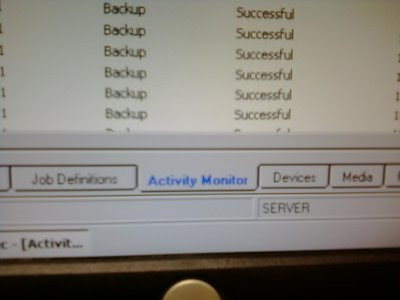 Figure 1. Activity Monitor
Left click on the labels describing the view pane you want to be in.
This is with my camera phone.
Once you are in the "activity monitor" you should be able to see a list of jobs that have run, are running, or failed. If you right click on a job, and select "Cancel" that will cancel the job for you. I have noticed that it sometimes takes a minute or two to actually cancel.
 Figure 2. Canceling a Job
Don't forget to wait a minute or two after you cancel the job
Manually Starting a Job
Once you have made sure there are no stuck jobs, you can manually start a job if you would like. The system I work with has scheduled jobs, so manually starting jobs shouldn't (hopefully) be necessary. I like to manually run a job to make sure everything is working OK after canceling a stuck job, rebooting, adding a new tape to the rotation or anything else that would make me doubt things are working perfectly.
One way I found to start a job is to navigate to the "Job Definitions" view pane. This is at the bottom on the screen, next to the "Activity Monitor" described above. Left click on this label to switch to that view.
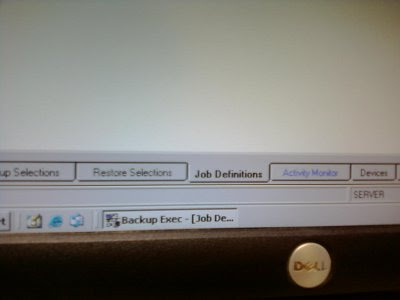 Figure 3. Job Definitions
This view lets you see all the jobs that have been created.
Once you are in this view, you can see all the different jobs that have been created for your system. For our system, we are interested in the job titled "Backup 0002." This job backs up our entire system. In order to run this job, right click on it and select "Run now..."
 Figure 4. Actually Running A Job
Conclusion
Hopefully this document clearly explains how to manually cancel and restart jobs using Veritas 8.6. The employee known simply as "The Handball Destroyer" at the office has picked up a lot of the the day to day responsibilities regarding the computer systems here and I hope this document helps them, and any of the Internet masses.
Also, I refrained from taking screen shots of the server since I would like it to stay in complete isolation. I do not want any sort of writable media entering that environment, and it is completely isolated with regards to networking. Sorry about the resulting lack of picture quality!
Lately I have been helping my family out with some of their information technology work down in Silver City. Since I live in Albuquerque, and Silver City is four hours away, I cannot help them all the time whenever something goes wrong. Something goes wrong quite often with the latest and greatest in 2001 backup technology with Vertitas Backup, version 8.6, revision 3878. Luckily, the machine running this backup system is on a totally isolated network, so we do not have to worry about the numerous security problems associated with running such an old version. My friend Ryan ALWAYS tells me to upgrade to a different backup system, but that isn't too high up on the IT priority list right now.
In Veritas lingo, a job represents the configurations associated with actually backing something up. Jobs are things that need to run in order to back up.
I find that I need to manually restart jobs, and cancel stuck jobs, as a means of achieving reliable backups. Hopefully this blog post will help that happen when I am not around and serve to show other people that may not be quite so familiar with Veritas 8.6 how to do that as well. I think providing documentation of IT work is very, very important and can save tons of time and money in the long run! Please leave me a comment if you find this post useful.
Canceling A Stuck Job
With this software, it is not easy or possible to run two different jobs at the same time, on the same tape. Sometimes a job becomes 'stuck' and runs forever. It is important to cancel these stuck jobs so you can start a new one. One way I found to cancel a stuck job involves being in the "Activity Monitor" window, as shown in the below image.
 Figure 1. Activity Monitor
Left click on the labels describing the view pane you want to be in.
This is with my camera phone.
Once you are in the "activity monitor" you should be able to see a list of jobs that have run, are running, or failed. If you right click on a job, and select "Cancel" that will cancel the job for you. I have noticed that it sometimes takes a minute or two to actually cancel.
 Figure 2. Canceling a Job
Don't forget to wait a minute or two after you cancel the job
Manually Starting a Job
Once you have made sure there are no stuck jobs, you can manually start a job if you would like. The system I work with has scheduled jobs, so manually starting jobs shouldn't (hopefully) be necessary. I like to manually run a job to make sure everything is working OK after canceling a stuck job, rebooting, adding a new tape to the rotation or anything else that would make me doubt things are working perfectly.
One way I found to start a job is to navigate to the "Job Definitions" view pane. This is at the bottom on the screen, next to the "Activity Monitor" described above. Left click on this label to switch to that view.
 Figure 3. Job Definitions
This view lets you see all the jobs that have been created.
Once you are in this view, you can see all the different jobs that have been created for your system. For our system, we are interested in the job titled "Backup 0002." This job backs up our entire system. In order to run this job, right click on it and select "Run now..."
 Figure 4. Actually Running A Job
After you have run your job, it is important to see how things are going. Switch back to the "Activity Monitor" and look at your running job, as can barely be clearly seen in the high-quality image below.
 Figure 5. Backup Job Successful!
 Figure 5. Backup Job Successful!
Hopefully this document clearly explains how to manually cancel and restart jobs using Veritas 8.6. The employee known simply as "The Handball Destroyer" at the office has picked up a lot of the the day to day responsibilities regarding the computer systems here and I hope this document helps them, and any of the Internet masses.
Also, I refrained from taking screen shots of the server since I would like it to stay in complete isolation. I do not want any sort of writable media entering that environment, and it is completely isolated with regards to networking. Sorry about the resulting lack of picture quality!
Subscribe to:
Comments (Atom)